


 About Urh Social
 Terms of Service
 Datenschutzbestimmungen
 Contact
Why Intelligent Document Processing Is Reshaping Business Operations
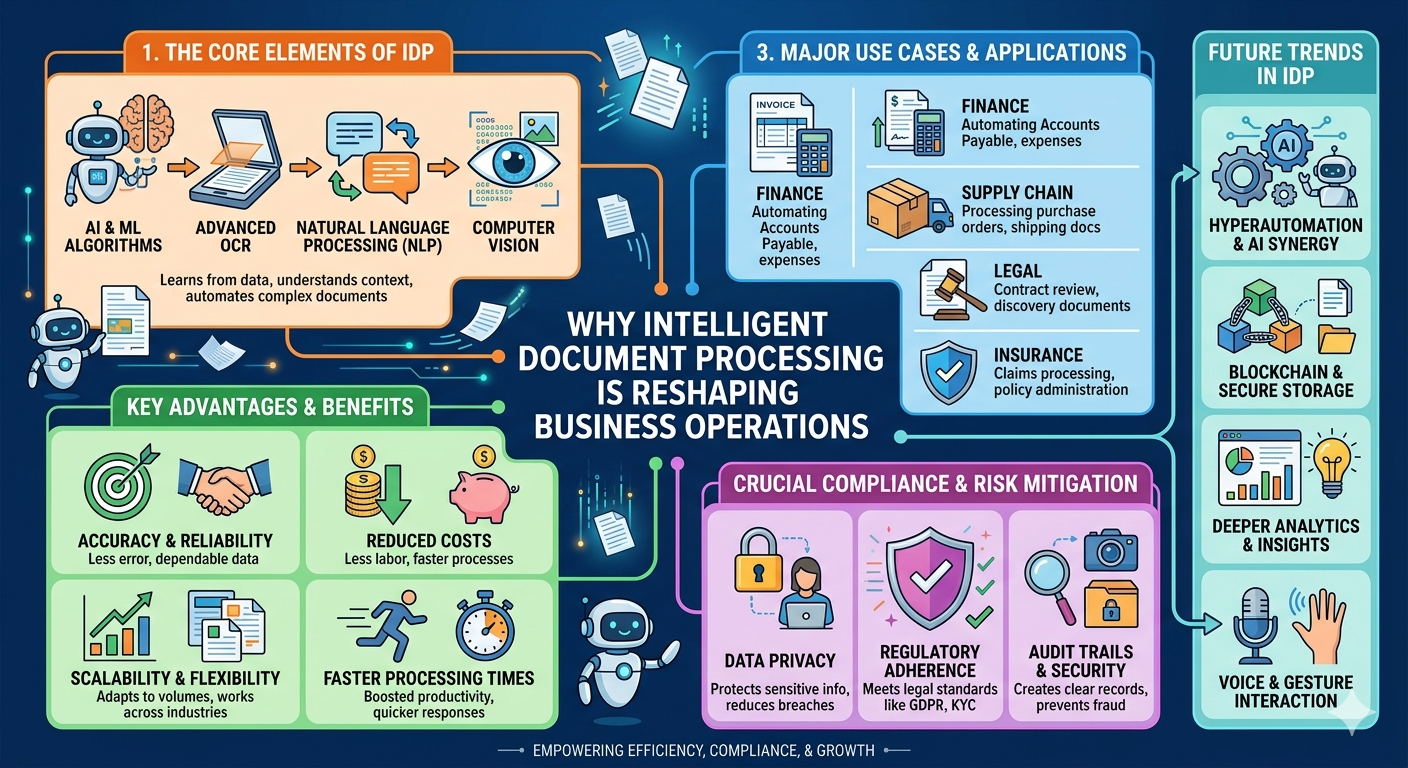
Businesses deal with large volumes of documents every day, including invoices, contracts, forms, emails, purchase orders, customer records, and compliance files. Intelligent Document Processing helps companies capture, read, classify, extract, and organize information from these documents with far less manual work. As teams face growing pressure to move faster and reduce errors, this technology is becoming a practical way to improve everyday operations.
1. It Reduces Manual Data Entry
Manual document handling is slow, repetitive, and prone to mistakes. Employees often spend hours copying information from PDFs, scanned files, forms, and emails into business systems.
Intelligent Document Processing helps automate this work by extracting key data such as names, dates, invoice numbers, totals, account details, and contract terms. This allows teams to focus on review, approval, and decision-making instead of basic data entry.
2. It Improves Accuracy Across Business Workflows
Human error is common when teams process documents manually. A wrong invoice amount, missed contract date, or incorrect customer detail can create delays, payment issues, and compliance problems.
With automation, businesses can improve consistency by using validation rules, confidence scores, and workflow checks. This does not remove human oversight completely, but it helps teams catch issues earlier and reduce avoidable mistakes.
3. It Speeds Up Document Processing
Slow document processing affects many departments. Finance teams wait on invoices. HR teams process employee forms. Legal teams review contracts. Operations teams manage delivery notes, purchase orders, and reports.
Intelligent Document Processing speeds up these workflows by turning unstructured or semi-structured documents into usable data faster. That means fewer delays, faster approvals, and smoother handoffs between teams.
4. It Helps Businesses Handle Higher Document Volumes
As companies grow, document volume grows too. More customers, vendors, employees, transactions, and compliance requirements create more paperwork and digital files.
Hiring more people to process documents manually is not always practical. Automation helps businesses manage larger volumes without overwhelming their teams.
This is especially useful for:
-
Finance and accounting teams
-
Insurance companies
-
Healthcare organizations
-
Legal departments
-
Logistics companies
-
Government agencies
-
HR departments
-
Customer service teams
5. It Makes Information Easier to Search and Use
Documents are often full of valuable information, but that value is locked away if the data cannot be searched or extracted. Intelligent Document Processing helps convert document content into structured data that can be indexed, searched, and connected to business systems.
For example, instead of opening dozens of invoices manually, a finance team can search by vendor, amount, date, or invoice number. A legal team can find contract clauses faster. An operations team can track forms and records more clearly.
6. It Supports Better Compliance and Audit Readiness
Many organizations need to prove that documents were processed correctly, approved by the right people, and stored properly. Manual workflows make this harder because records may be scattered across email, folders, and spreadsheets.
Intelligent Document Processing can support compliance by creating cleaner audit trails, standardizing document classification, and reducing missing information. It helps businesses maintain better control over documents that may be reviewed during audits or legal requests.
7. It Connects Documents With Business Systems
A major benefit of Intelligent Document Processing is that it does not just read documents. It can send extracted data into ERP systems, CRM platforms, accounting tools, document management systems, and workflow automation platforms.
This reduces disconnected work and helps departments operate from the same information. When document data flows directly into business systems, teams spend less time chasing files and more time using the information.
8. It Improves Customer and Vendor Experiences
Slow document processing does not only affect internal teams. It can also frustrate customers, vendors, and partners.
For example, delayed invoice processing can slow vendor payments. Slow onboarding paperwork can frustrate new customers or employees. Missed forms can delay service delivery.
By processing documents faster and more accurately, businesses can respond more quickly and build stronger trust with the people they work with.
9. It Lowers Operational Costs Over Time
Manual document work costs money. It takes employee time, creates rework, slows approvals, and increases the risk of errors. Intelligent Document Processing can help reduce these costs by automating repetitive tasks and improving workflow efficiency.
The savings often come from fewer manual hours, faster cycle times, fewer corrections, and better use of employee skills.
10. It Helps Businesses Make Smarter Decisions
Documents contain important business data. Invoices show spending patterns. Contracts reveal obligations. Customer forms show service needs. Claims documents show risk trends.
When this information is extracted and organized, leaders can use it to make better decisions. Intelligent Document Processing turns static documents into useful operational insight.
Conclusion
Businesses cannot afford slow, manual, and scattered document workflows forever. Intelligent Document Processing gives organizations a smarter way to capture, extract, validate, and use information from documents.
It improves speed, accuracy, compliance, searchability, and operational control. As companies continue to manage more digital records and paperwork, this technology is reshaping how business operations work from the inside out.

 English
 Arabic
 French
 Spanish
 Portuguese
 Turkish
 Dutch
Dutch
 Italiano
 Russian
 Romaian
 Portuguese (Brazil)
 Greek
Greek
