


 About Urh Social
 Terms of Service
 سياسة الخصوصية
 Contact
How Smarter Maintenance Planning Keeps Equipment Working Longer
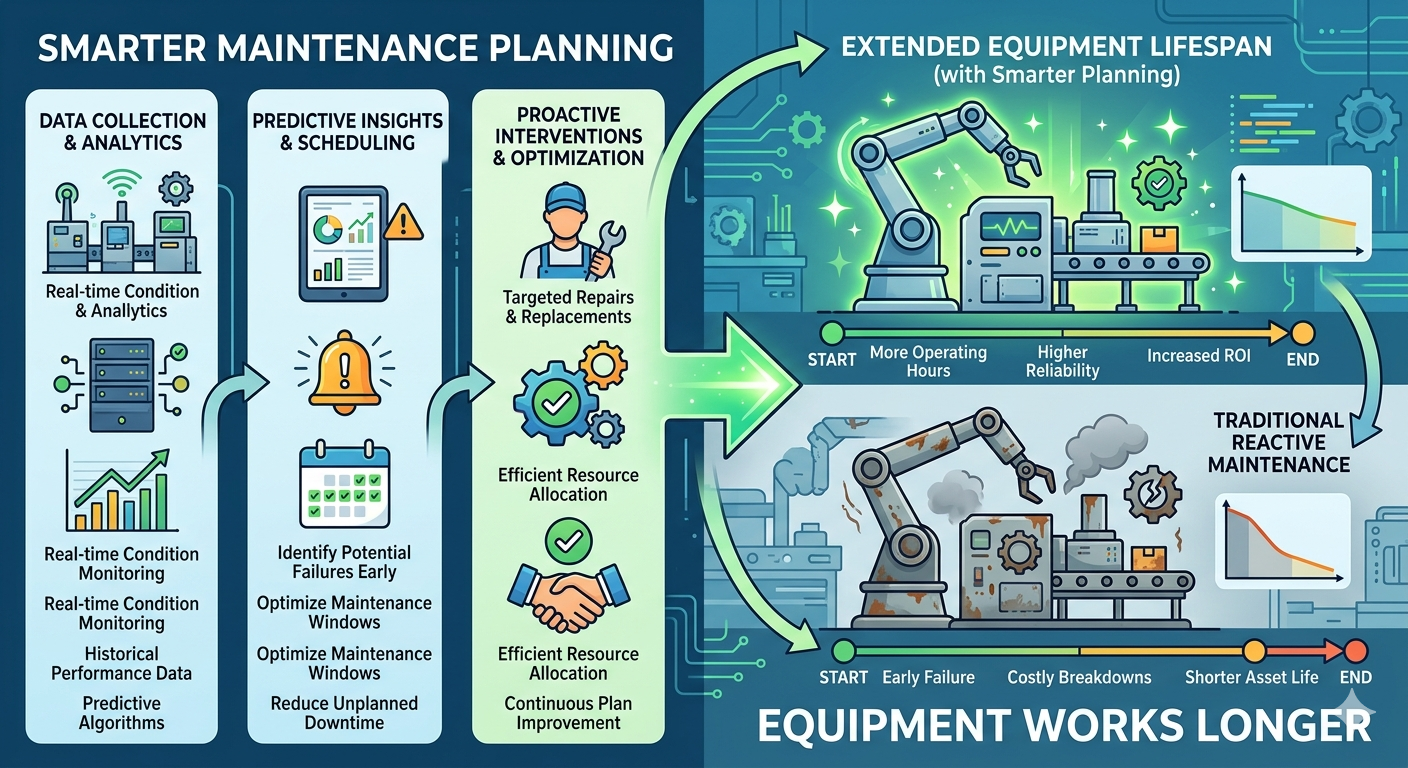
Equipment downtime can turn a productive jobsite into a stalled operation within minutes. When excavators, loaders, haul trucks, cranes, or compactors stop working, crews wait, schedules slip, and repair costs rise. In construction, equipment does not fail at a convenient time. It usually breaks when the project needs it most. This is why construction equipment maintenance software has become an important tool for companies that want better control over repairs, inspections, service schedules, and operating costs.
Strong maintenance planning is not only about fixing equipment after it breaks. It is about knowing what needs service, when it needs attention, who is responsible, and what repair history already exists. Without that structure, maintenance teams work reactively. That creates more emergency repairs, more downtime, and more pressure on field teams.
Why Equipment Maintenance Needs Better Planning
Downtime Affects the Entire Jobsite
One failed asset can delay several parts of a project. If a loader stops working, material handling slows down. If an excavator is unavailable, earthwork can stop. If a truck misses service, hauling schedules may fall behind.
These delays affect labor productivity, equipment utilization, and project timelines. Construction teams need a reliable way to stay ahead of equipment problems before they become jobsite disruptions.
Manual Tracking Creates Gaps
Many teams still rely on spreadsheets, paper forms, phone calls, and whiteboards to manage maintenance. That may work for a small number of assets, but it becomes risky as the fleet grows.
Manual tracking makes it easy to miss service intervals, lose inspection notes, or forget repair details. Construction equipment maintenance software helps replace scattered records with one organized system.
How Maintenance Software Reduces Downtime
Preventive Maintenance Scheduling
Preventive maintenance helps keep equipment in working condition by servicing assets before failure happens. Software can schedule maintenance by engine hours, mileage, calendar dates, usage, or inspection results.
This helps teams avoid guessing. Instead of waiting for a breakdown, maintenance teams can see what service is due and plan repairs around jobsite needs.
Faster Defect Reporting
Operators are often the first to notice equipment issues. A strange noise, warning light, hydraulic leak, or tire problem may seem small at first, but it can become serious if ignored.
With digital inspection forms, operators can report issues with notes and photos. Maintenance teams can review the issue quickly and decide whether to create a work order. This improves response time and reduces the chance of minor defects becoming major failures.
Better Work Order Management
Clear Repair Tasks
Work orders help maintenance teams understand what needs to be done. A strong system can include the asset name, issue description, priority level, assigned technician, required parts, labor notes, and repair status.
This creates accountability. Mechanics know what to fix, managers know what is open, and field teams know whether equipment is ready for use.
Repair History in One Place
Repair history matters because repeat problems often reveal deeper issues. If the same asset keeps failing, the team needs to know whether the problem is poor operation, missed maintenance, old parts, or equipment reaching the end of its useful life.
Construction equipment maintenance software stores repair records in one place. This helps teams make better decisions about repair, replacement, warranty claims, and future equipment planning.
Improving Safety Through Maintenance
Catching Safety Issues Early
Equipment that is not maintained properly can create safety risks. Brake problems, steering issues, leaks, worn tires, damaged attachments, and electrical faults can put operators and nearby workers at risk.
Regular inspections and maintenance alerts help catch these issues before they cause incidents. This supports safer jobsites and stronger compliance practices.
Documentation for Compliance
Construction companies often need maintenance records for audits, insurance reviews, internal safety programs, and client requirements. Paper records can be lost or incomplete.
Digital maintenance systems create a clearer audit trail. Teams can show when inspections happened, what defects were found, what repairs were completed, and who performed the work.
Controlling Maintenance Costs
Reducing Emergency Repairs
Emergency repairs usually cost more than planned maintenance. They often involve rush parts, extra labor, towing, rental replacements, and lost production time.
Planned maintenance helps reduce these surprises. When teams know what service is coming, they can schedule work at a better time and avoid expensive last-minute decisions.
Better Parts and Labor Visibility
Maintenance software can help track parts used, labor hours, vendor costs, and repair frequency. This gives managers a clearer picture of what each asset costs to keep running.
Over time, this data helps identify equipment that is too expensive to maintain. It also supports smarter budgeting and replacement planning.
Supporting Field and Shop Communication
Faster Updates Between Teams
Field teams need to know whether equipment is available. Shop teams need to know which issues are urgent. Office teams need cost and status updates.
A digital maintenance system keeps everyone aligned. Instead of waiting for calls or chasing updates, teams can view current repair status and plan around equipment availability.
Better Prioritization
Not every issue has the same level of urgency. A cosmetic issue may wait, but a brake defect or hydraulic leak needs immediate attention.
Maintenance software helps teams prioritize work based on severity, safety risk, and jobsite impact. This keeps critical repairs from getting buried under less urgent tasks.
What to Look for in Maintenance Software
Key Features That Matter
Useful features include preventive maintenance scheduling, digital inspections, work orders, defect tracking, parts records, repair history, technician assignments, alerts, and reporting dashboards.
The best system should support real field workflows. If the software is hard to use, teams will avoid it, and the maintenance process will fall apart.
Mobile Access Is Essential
Construction maintenance does not happen only in an office. Operators, supervisors, and mechanics need mobile access from the field, yard, or shop.
Mobile-friendly software helps teams submit inspections, update work orders, upload photos, and check repair status without waiting until they return to a desk.
Final Thoughts
Maintenance planning directly affects productivity, safety, and cost control. When equipment is serviced on time and defects are handled quickly jobsites run more smoothly.
Construction equipment maintenance software helps teams move from reactive repairs to planned maintenance. It improves visibility, reduces downtime, strengthens documentation and gives companies better control over the equipment they rely on every day.

 English
 French
 Spanish
 Portuguese
 Deutsch
 Turkish
 Dutch
Dutch
 Italiano
 Russian
 Romaian
 Portuguese (Brazil)
 Greek
Greek
